


For brands
Products News

Ankorstore Product News - January 2026
12 January 2026
Welcome to our dedicated product update section!
Every quarter, you’ll find here all the new features and services designed to help you get even more value from Ankorstore: grow your sales, better manage your business, and also expand your network!
 Mickaël Ruffinoni
1. Simplifying the Ankorstore model
Gain greater transparency and control over your B2B activity.
Since 2019, our mission has been to help you grow your B2B business at every stage of your journey. Your feedback was clear: you wanted more transparency and more control. With the new Ankorstore model, we’ve turned these expectations into reality.
Benefits for your business:
- 0% commission on all reorders
- Full flexibility on your Commercial Terms: minimum order value, free shipping threshold, shipping fees
- Secured cash flow with guaranteed payment within 2 days
- Controlled B2B acquisition costs, charged only once for each new customer brought by Ankorstore
- Meeting a key retailer expectation: prices aligned with your catalogue prices on Ankorstore
Benefits for retailers:
With our new payment solution, Aria, more retailers can now benefit from deferred payment options (including 60- and 90-day payment terms), making purchases easier and further securing your sales.
How it works:
- Complete your company and payment information if you haven’t already, to benefit from the new model
- Set up your commercial terms in your back-office (minimum order value, free shipping threshold, shipping fees)
>>> Find the summary of required actions in your Dashboard. For more details on the changes introduced with the new model, visit our dedicated page.
2. Driving your commercial performance
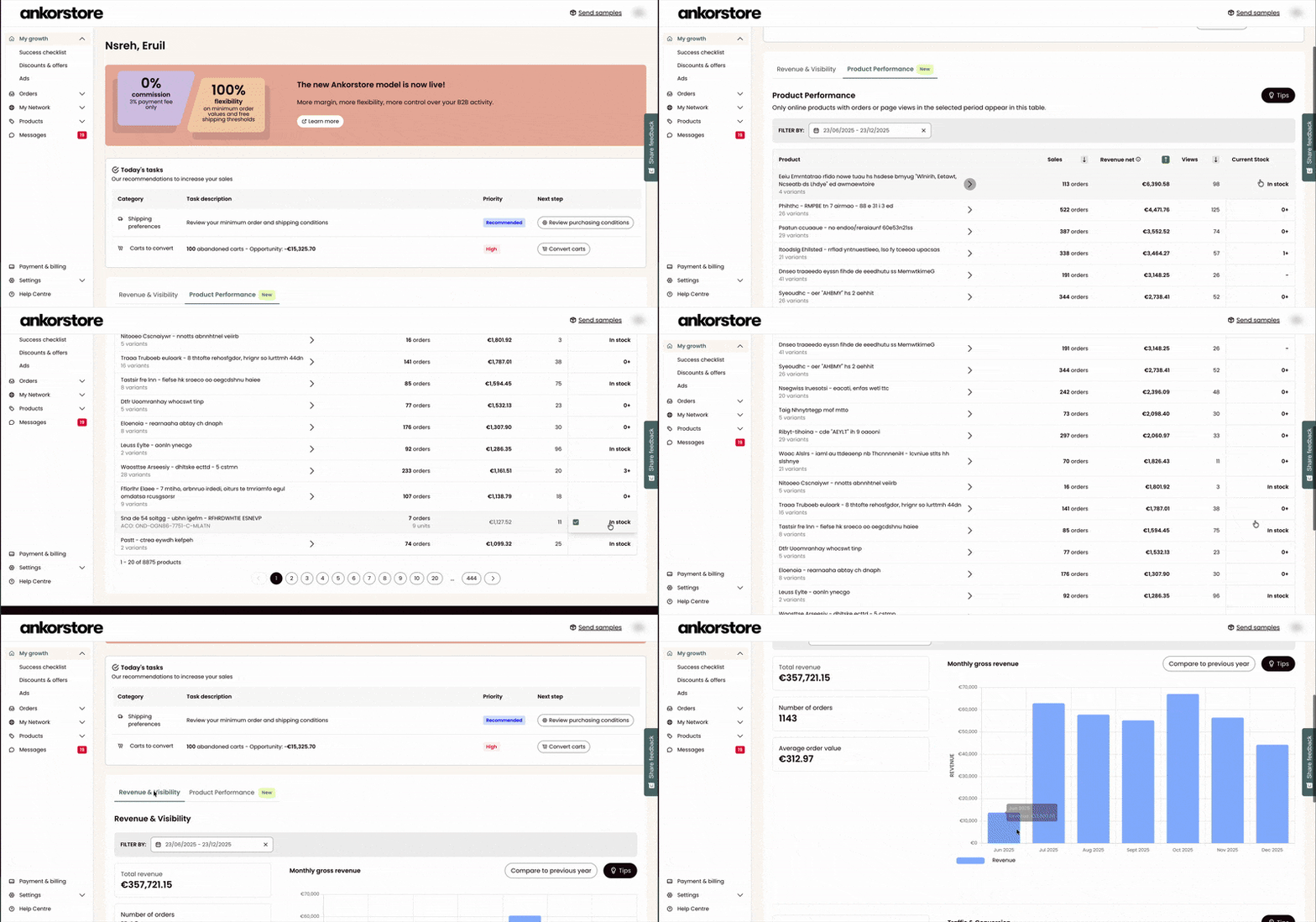
Drive your activity with a personalized Dashboard.
Get a clear overview of your brand’s performance on Ankorstore and quickly identify the right levers to grow your business.
What you can do:
- Track your key performance indicators: revenue, number of orders, average order value
- Analyze your results with a monthly view, including year-over-year comparisons and segmentation based on retailers’ order history
- Measure your brand’s visibility with a dedicated chart showing shop visits and product views
- Quickly identify best-sellers and optimization opportunities via the Product Performance section (for example, updating stock levels in one click)
- Access a list of personalized actions to guide you through: activating your discounts / configuring your commercial terms /converting open carts
How it works:
- Go to your Dashboard from your back-office
- Select the period you want to analyze
- Review the recommended actions to prioritize next steps and manage your activity day to day
>>> Head to your Dashboard now for a complete overview of your brand’s performance and your prioritized list of personalized actions.
3. Centralized discounts and offers
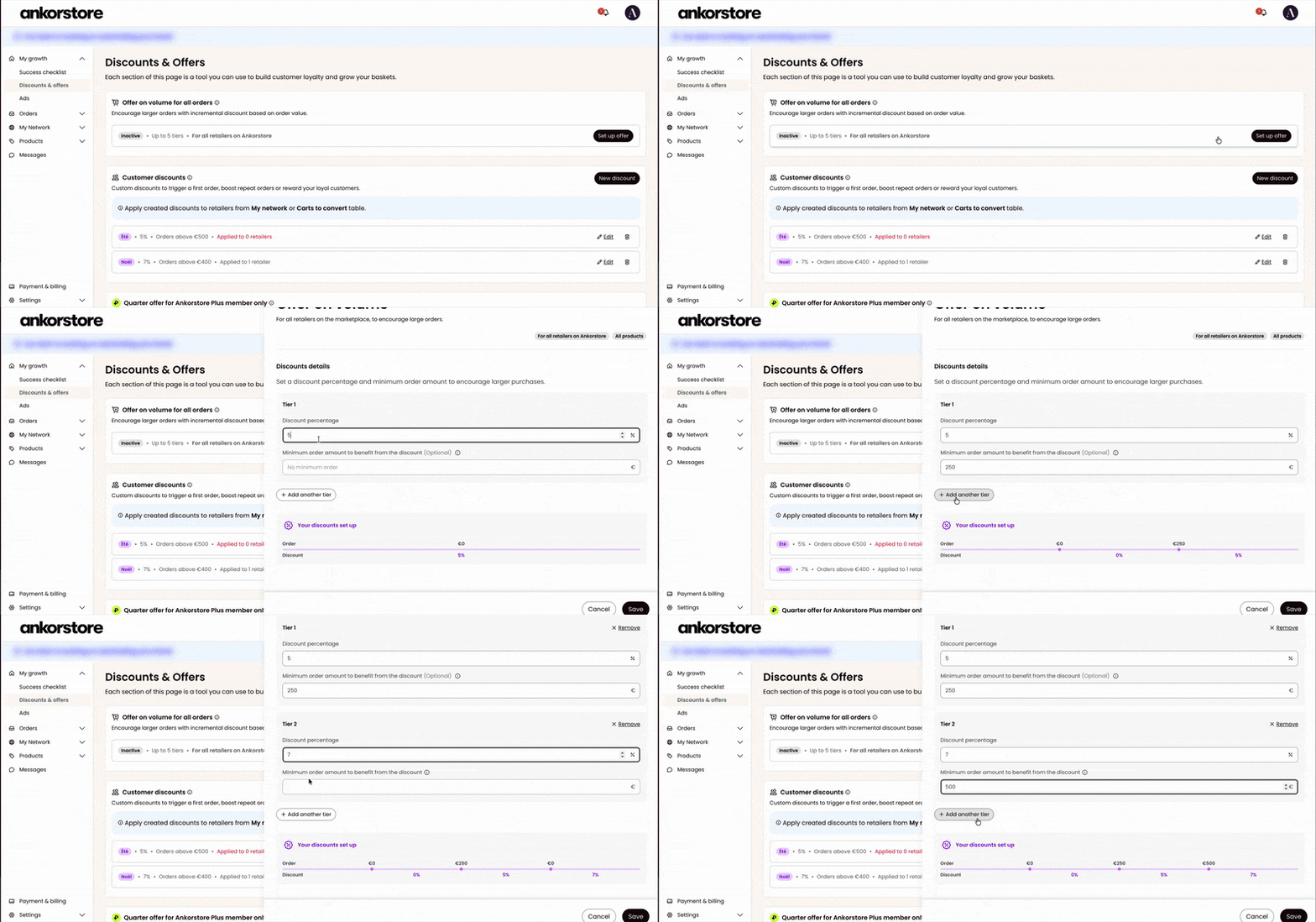
Bring all your promotional levers together in one dedicated space.
We’ve centralized your discounts and offers in a single place to help you manage your promotional actions more easily and gain efficiency.
What you can do:
- Set up volume discounts (up to 5 tiers), offering progressive discounts on order value to all retailers on the platform
- Offer personalized discounts to selected retailers only
- Create offers reserved for Ankorstore Plus members to strengthen loyalty
- Benefit from increased visibility of your offers across the marketplace (search results, brand page, product pages)
How it works:
- Go to the Discounts & Offers page in your back-office
- Configure your volume discounts or personalized discounts in just a few clicks
- Define tiers, conditions, and eligible retailers
>>> Visit the Discounts & Offers page now to set up your promotional levers in just a few clicks.
4. Improved order delay management
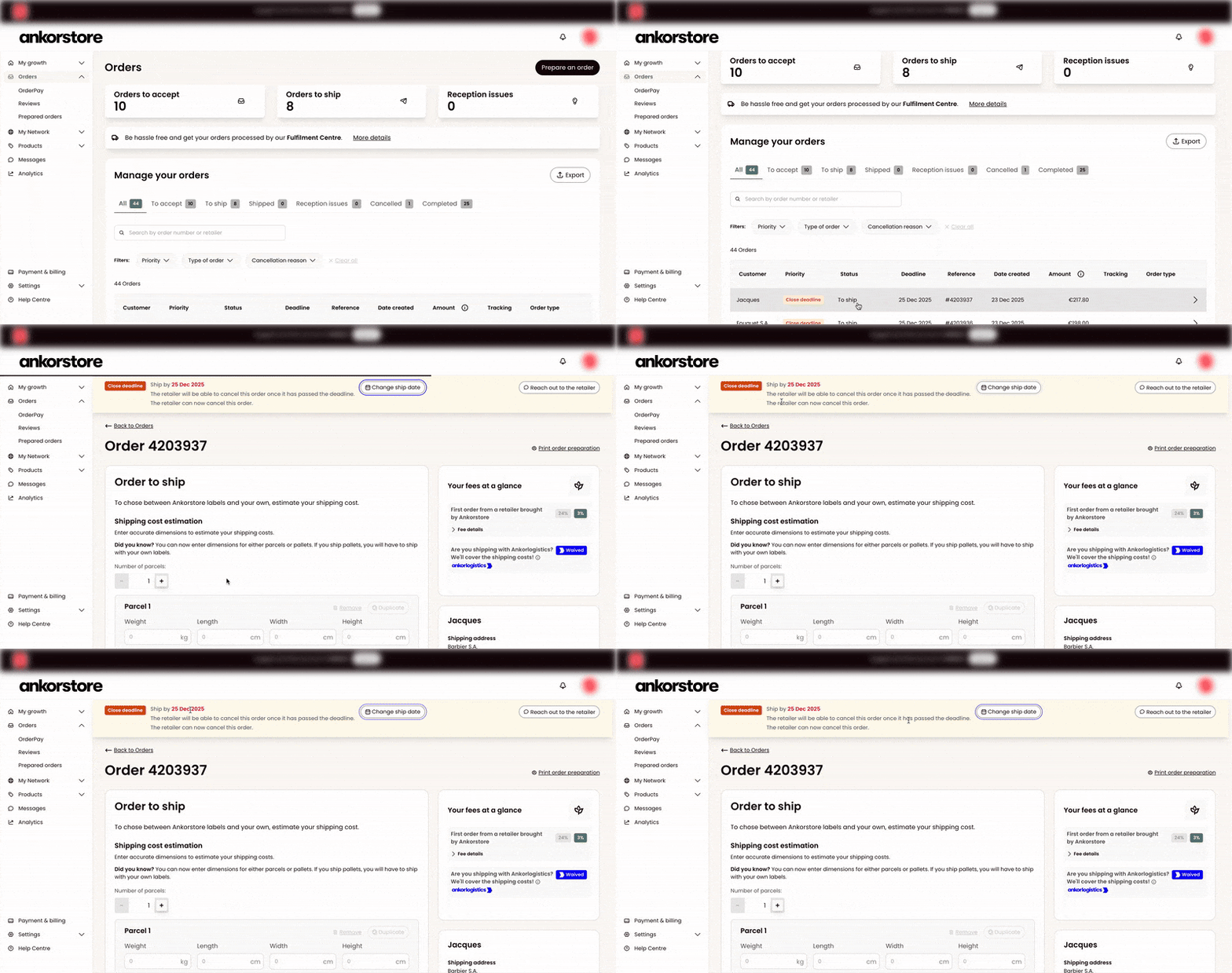
Communicate more easily with retailers when delays occur.
Declare an order delay in just a few clicks and automatically share a new estimated shipping date with retailers, ensuring greater transparency and a smoother experience.
What you can do:
- Declare an order delay directly from the Orders section of your back-office
- Enter a new estimated shipping date, visible to retailers
- Automatically notify retailers of the update, with no additional action required
How it works:
- Go to the Orders section in your back-office and select the relevant order
- Enter the new estimated shipping date
- The retailer is informed in real time
>>> Declare an order delay in one click from your back-office and keep retailers informed transparently.
5. Greater flexibility for your orders
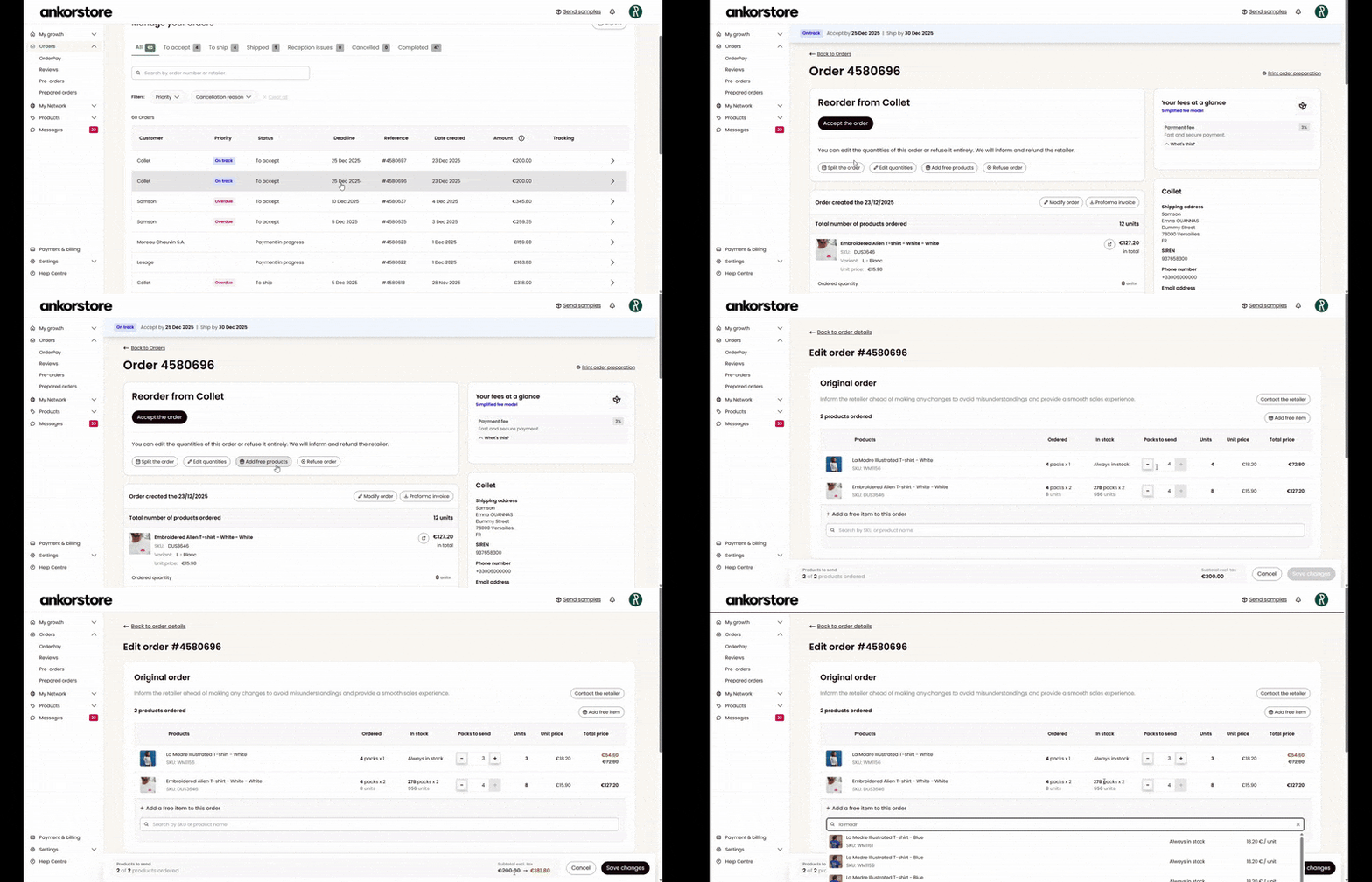
Adapt your orders more easily, even after acceptance.
Edit your orders before or after acceptance to handle necessary adjustments more smoothly, with no friction for retailers.
What you can do:
- Edit an order before or after acceptance
- Remove items directly from the order
- Add free products if needed
- Apply changes without creating a new order
How it works:
- Go to the Orders section in your back-office and select the relevant order
- Make the desired changes (items, quantities, additions)
- Updates are automatically applied and visible to retailers
>>> Edit your orders easily from your back-office, even after acceptance.
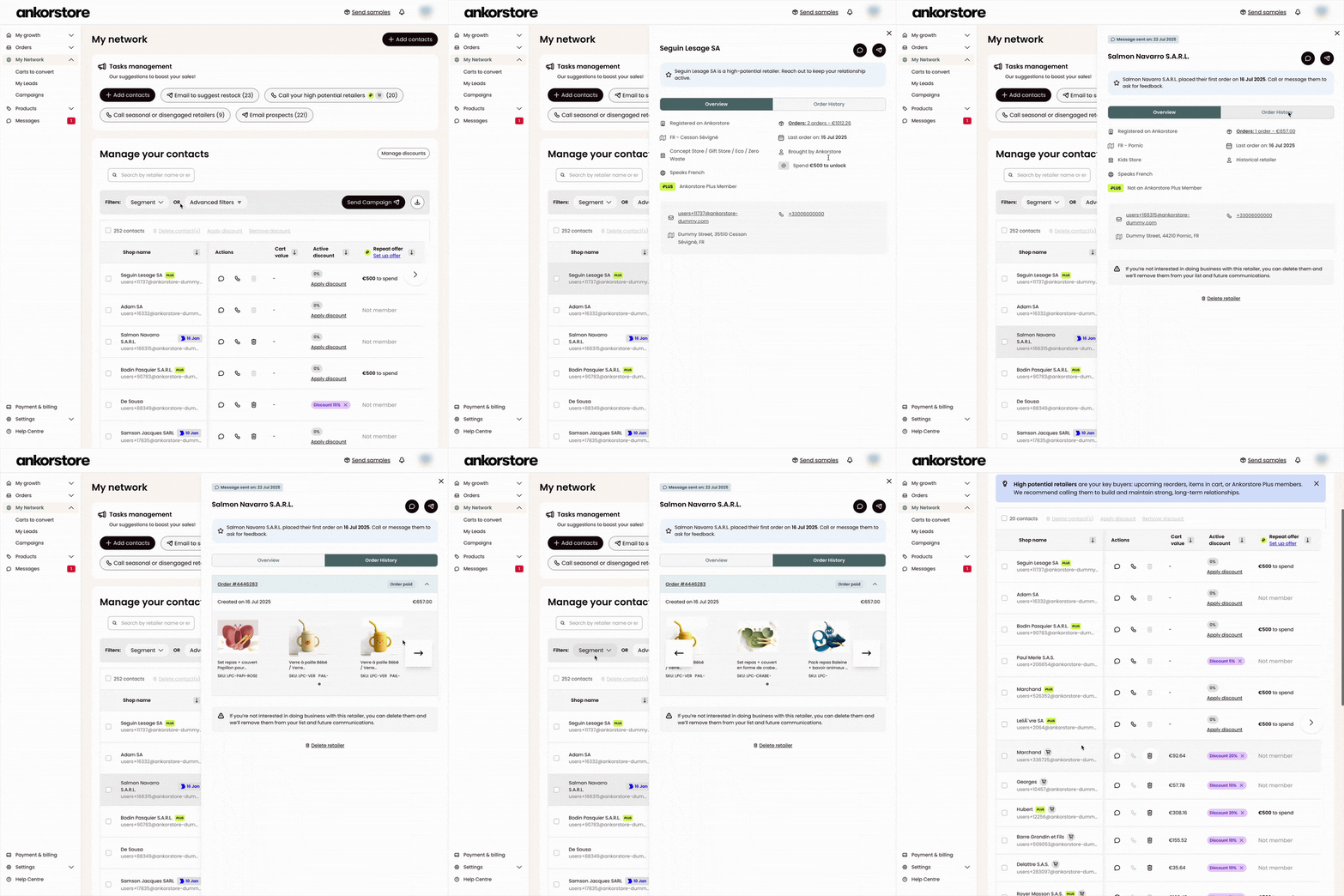
6. Unified view of your retailer contacts
Access all your retailer information and conversations in one place.
Get a centralized view of each retailer to easily track your interactions, orders, and the history of your business relationship.
What you can do:
- Access key retailer information: contact details, order history, last contact, acquisition source
- Segment your contacts (existing customers, prospects) to tailor your commercial actions
- Create personalized email campaigns with AI assistance, generating content adapted to your segments in multiple languages
- Track the full history of your interactions (messages, campaigns sent, recent touchpoints)
How it works:
- Go to My Network from your back-office
- Use filters and segments to organize your contacts
- Click on a retailer to access relationship details and trigger your commercial actions
>>> Go to My Network now to make the most of your retailer contacts.
7. UPS shipping to International Zone 2
Ship to more countries with negotiated carrier rates.
Since January 15, the 2026 shipping price grid applies to shipments made via our partner carriers (UPS, DHL). It has been updated to more accurately reflect transport costs and to reopen UPS shipping to International Zone 2.
What you can do:
- Ship orders to retailers located in International Zone 2 using Ankorstore shipping labels (UPS)
- Reach more retailers internationally
- Benefit from Ankorstore-negotiated carrier rates, adjusted by weight and destination
Zone overview:
- International Zone 1 (EU8): Austria, Belgium, France, Germany, Italy, Netherlands, Spain, United Kingdom
- International Zone 2 (nonEU8): Bulgaria, Switzerland, Cyprus, Denmark, Estonia, Finland, Greece, Croatia, Hungary, Ireland, Lithuania, Luxembourg, Latvia, Malta, Poland, Portugal, Romania, Sweden, Slovenia, Slovakia
How it works:
- The 2026 shipping price grid has been automatically applied since January 15
- New rates are already visible in your Ankorstore account
- No action is required on your side
>>> Visit the dedicated Help Center article to view the 2026 shipping price grid and associated costs.
Now is the perfect time to explore these new features and start integrating them into your daily routine to continue growing your business with Ankorstore under the best possible conditions.
See you next quarter for more product updates and new features!

Related posts "Products News"

Une communication client efficace est la clé du succès pour toute marque B2B. Dans cet article, découvrez comment établir une relation client solide et personnalisée pour augmenter les ventes de votre entreprise et renforcer votre expérience client.

Une communication client efficace est la clé du succès pour toute marque B2B. Dans cet article, découvrez comment établir une relation client solide et personnalisée pour augmenter les ventes de votre entreprise et renforcer votre expérience client.

Une communication client efficace est la clé du succès pour toute marque B2B. Dans cet article, découvrez comment établir une relation client solide et personnalisée pour augmenter les ventes de votre entreprise et renforcer votre expérience client.