


News

Ankorstore Product News - October 2026
13 October 2026
Ankorstore updates: discovery, ordering, payments and relationship , what’s new this quarter
This quarter, we’ve been working on every step of the ordering journey, from discovering a brand to building a lasting relationship. Here’s everything that’s new and improved on the platform, for both retailers and brands.
Heloise Mitry
Table of content
- 1. Find the brands that are right for your shop more easily
- 2. Make it easier for retailers to place their first order
- 3. Order faster, restock at the right time
- 4. Keep control of your cash flow
- 5. Get ready for electronic invoicing
- 6. Save time on your marketing campaigns with our IA agent and WhatsApp
- 7. Get help faster
1. Find the brands that are right for your shop more easily
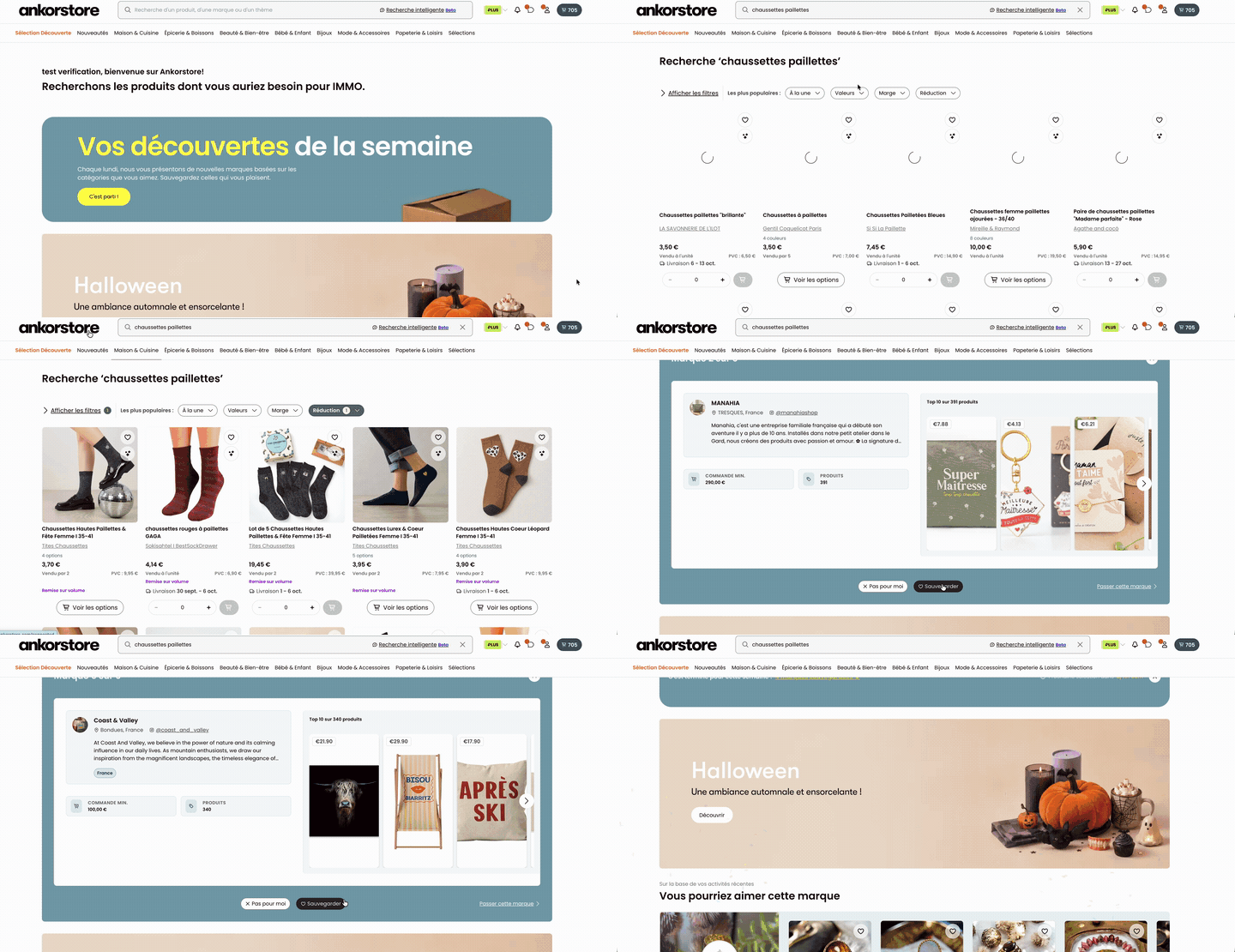
Better search means better choices — and we’ve redesigned our search tool with that in mind.
Every discovery starts with a search. Our search engine has been improved to better understand your intent and surface more brands. You can filter by discount or by new brands. And every week, the Brand of the Week recommends six brands selected for your shop, right on the homepage — to follow or skip.
What you can do:
- Search by product, category or universe
- Filter results by discount or new brands
- Discover six brands recommended for your shop profile every week
- Follow a brand so you don’t lose track of it
How it works:
- Go to the homepage or use the search bar
- Enter your search and refine with the available filters
- Check the Brand of the Week module on the homepage for your personalised recommendations
- Click “Follow” to easily find a brand again later in your network
2. Make it easier for retailers to place their first order
Better-organised collections, an official Starter Pack, and +16% clicks on your catalogues.
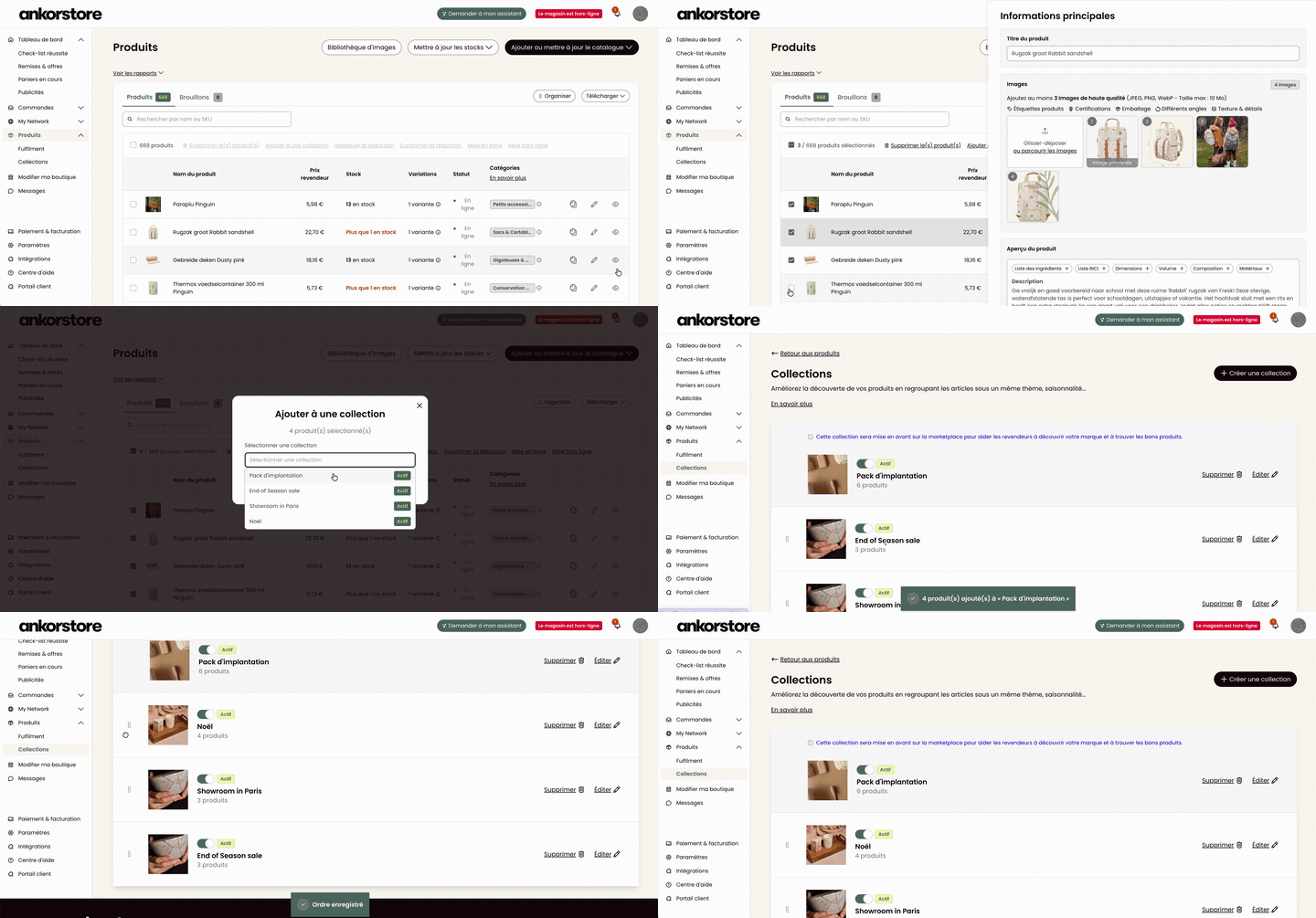
For a retailer discovering you for the first time to actually place an order, your catalogue needs to be clear and compelling. We’ve made it easier to create and organise your Collections from your back office: bulk adding, drag-and-drop reordering, and now the ability to include an official Starter Pack — the ideal selection for a first order.
What you can do:
- Create and organise your Collections in bulk from your back office
- Reorder products using drag-and-drop
- Add an official Starter Pack to your catalogue
- Increase your chances of conversion from a retailer’s very first visit
How it works:
- Go to the Collections section in your brand back office
- Create a new collection and add your products in bulk
- Reorder products using drag-and-drop
- Activate a Starter Pack by selecting the key products for a first order
3. Order faster, restock at the right time
No more switching between pages: your basket follows you, and Smart Reorder guides you.
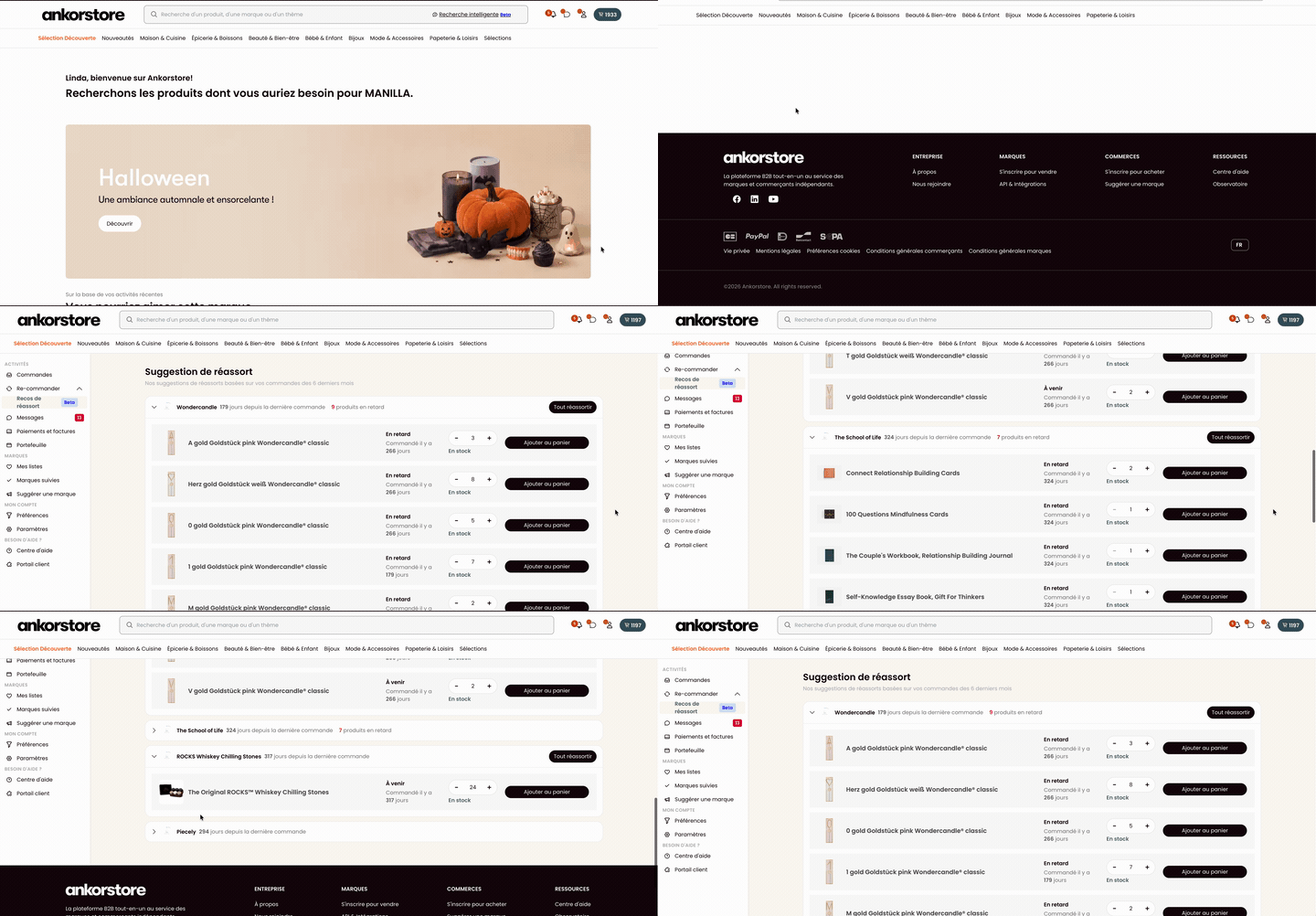
Preparing an order used to mean jumping between pages. Now, your basket follows you on every brand page: you can see in real time how close you are to the order minimum and free shipping, then check out in one click. And with Smart Reorder, Ankorstore tells you what to restock — and when.
What you can do:
- Track your progress towards the order minimum on every brand page
- Check out in one click without leaving the page
- Get personalised restock recommendations with Smart Reorder
- Save time and manage your assortment more effectively
How it works:
- Browse any brand page: your basket is displayed in real time
- Follow the progress bar towards the order minimum and free shipping threshold
- Check out in one click directly from the brand page
- View your Smart Reorder recommendations from your dashboard
4. Keep control of your cash flow
What’s due, what’s coming, what you can spend — all in one place.
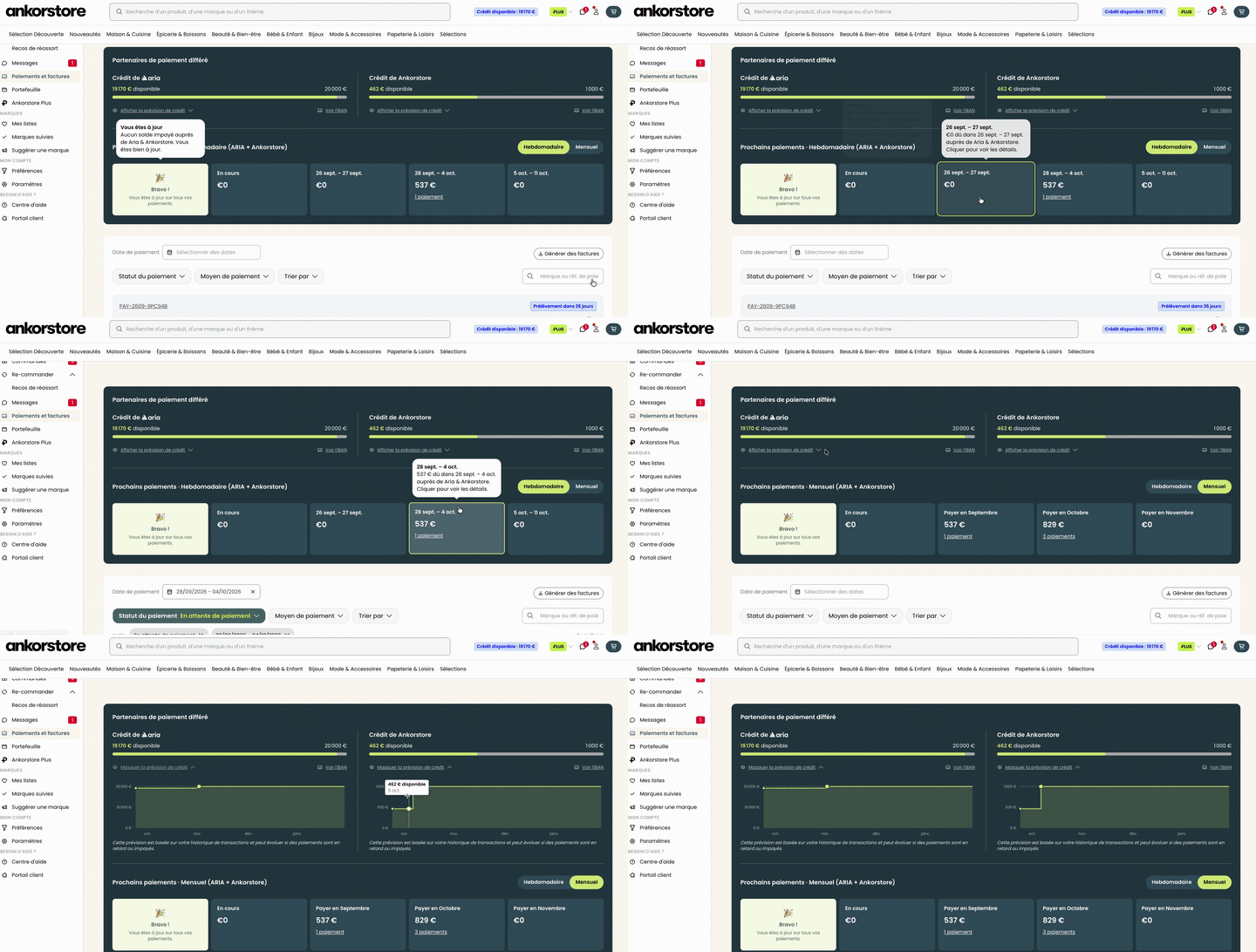
After the order comes the cash flow. And for a retailer, that’s everything. The Payments & Invoices dashboard centralises all your financial information: upcoming due dates, available credit, and the ability to settle an overdue invoice in one click. Since its launch, weekly usage has more than tripled.
What you can do:
- See all your current and upcoming payments at a glance
- Check your available credit at any time
- Settle an overdue invoice in one click directly from the dashboard
- Plan ahead and manage your cash flow with confidence
How it works:
- Go to the Payments & Invoices section in your back office
- Browse the “Upcoming payments” and “Available credit” tabs
- Identify an overdue invoice and click “Pay now” to settle it in one click
- Access your full payment history at any time
5. Get ready for electronic invoicing
Electronic invoicing is rolling out across Europe — Ankorstore handles everything.
Electronic invoicing is being gradually introduced across Europe. The good news: you don’t need to change a thing. Ankorstore automatically generates your invoices in the correct format (Factur-X). Sign up to our newsletter to stay up to date.
What you can do:
- Keep using the platform as usual
- Find your invoices in Factur-X format directly in your back office
- Stay informed about upcoming regulatory deadlines via our newsletter
How it works:
- No action required on your end: Ankorstore automatically generates your invoices in the correct format
- Find your invoices in the Payments & Invoices section of your back office
- Sign up to our newsletter to follow the next steps of the rollout
6. Save time on your marketing campaigns with our IA agent and WhatsApp
A first order is great. A lasting relationship is better, our IA agent takes care of it.
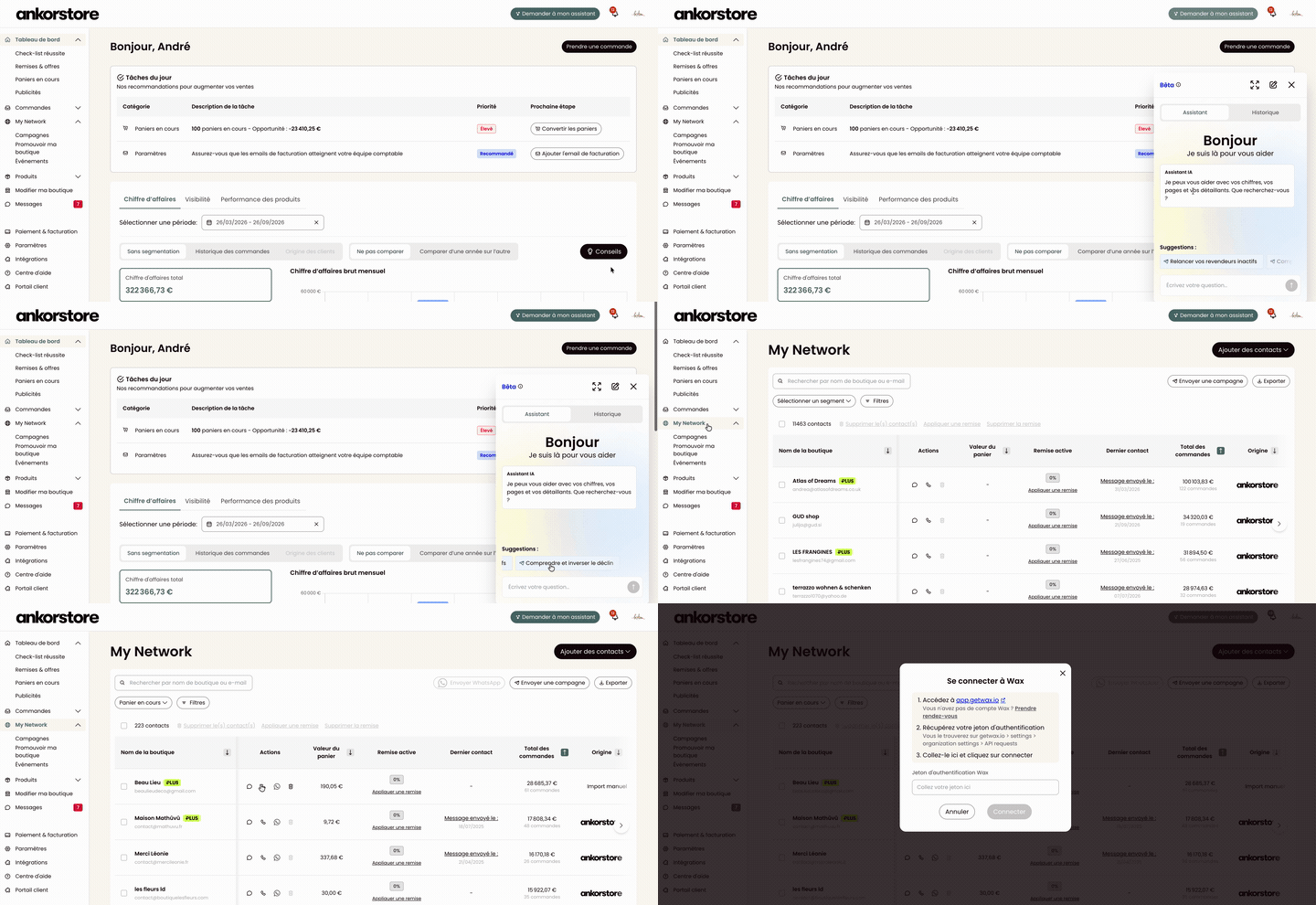
Our AI agent built into My Network, analyses your network, identifies the next action to take, a follow-up message, an email campaign, a new contact, and executes it for you. And thanks to our WAX integration, you can now reach your retailers on WhatsApp in one click, directly from My Network.
What you can do:
- Let our IA agent analyse your network and suggest the next action
- Approve and execute an action (message, email campaign) in one click
- Reach your retailers on WhatsApp via the WAX integration
- Spend less time managing your retailer network
How it works:
- Go to My Network in your brand back office
- Review Raily’s suggestions in your action cards
- Approve the suggested action — Raily executes it for you
- For WhatsApp: select a retailer, click the WhatsApp icon and send your message via WAX
7. Get help faster
Our support is now accessible directly from your back office, in real time.
Our new support portal, powered by Pylon, lets you chat live with our teams and track every request from your back office — without ever leaving the platform.
What you can do:
- Open a live chat with our support teams directly from your back office
- Create and track your requests in real time
- Get a faster response, without switching tools
How it works:
- Access the support portal from your back office
- Start a live chat or submit a new request
- Track the progress of your request directly from the platform
Every update this quarter started from a real problem raised by a retailer or a brand. Thank you for your feedback, it’s our main source of inspiration.
Our teams are already working on the next improvements. See you next quarter for what’s coming.
Find out all about Ankorstore and Ankorstart news and partnerships.
Related posts "News"

Newsfeed – New tools, features and improvements
This page brings together all the latest news and updates from Ankorstore for retailers. Discover new tools, features and improvements every month, all designed to make your buying experience easier. Bookmark this page to make sure you never miss an update!
Newsfeed – New tools, features and improvements
Cette page rassemble toutes les dernières nouveautés et mises à jour d’Ankorstore pour les marques. Retrouvez chaque mois les nouveaux outils, fonctionnalités et améliorations conçus pour faciliter votre expérience de vente. Pensez à ajouter cette page à vos favoris pour ne manquer aucune nouveauté !

Autumn’s must-haves : trends to watch

Communication Kit: Get Ready for Ankorstore Days